
参考链接:https://blog.csdn.net/Pandafz1997/article/details/120558429
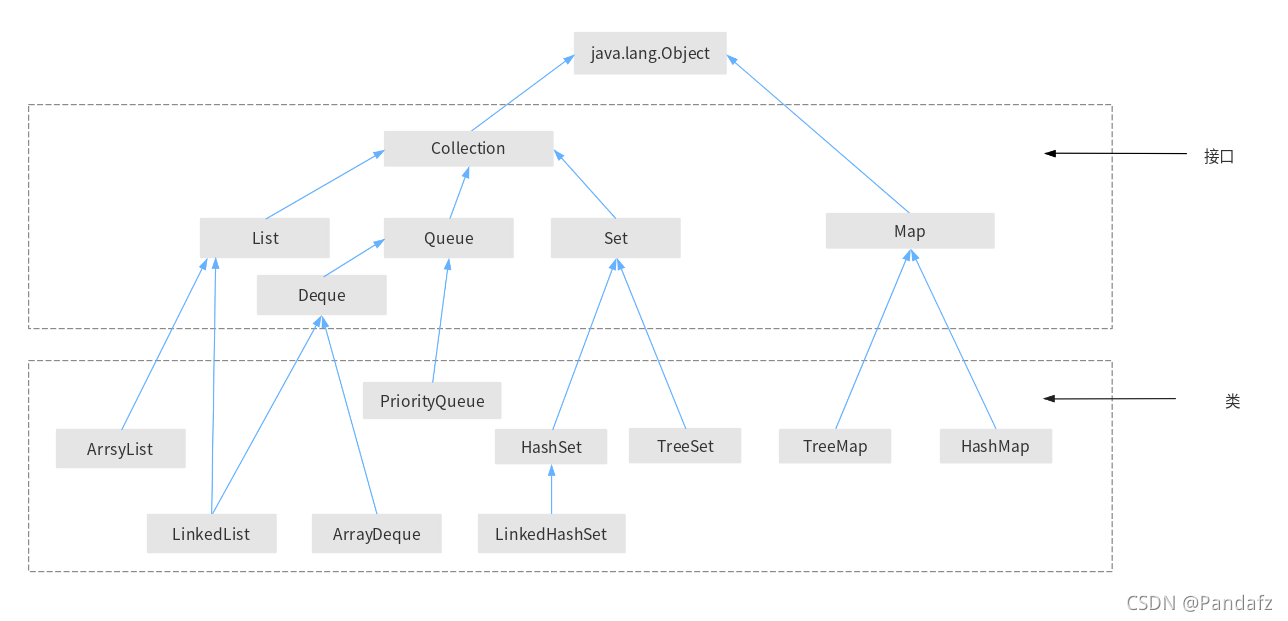
Iterator接口
Iterator通过遍历(迭代访问)集合中的元素来获取或删除某元素
import java.util.*;

public class RongQi {
    public static void main(String[] args) {
        ArrayList arrayList = new ArrayList();
        arrayList.add("ab");
        arrayList.add("cd");
        arrayList.add("df");
        System.out.println("集合内容如下: ");
        Iterator iterator = arrayList.iterator();// iterator()方法返回一个Iterator对象
        while (iterator.hasNext()) {
            Object o = iterator.next();
            System.out.println(o);
            if (o.equals("df")) {
                iterator.remove();
            }
        }
        System.out.println("删除df之后 " + arrayList);
    }
}
集合内容如下:
ab
cd
df
删除df之后 [ab, cd]
List
List可以将元素维持在特定序列中,常见的子类实现有
ArrayList 快速查询,插入删除效率低
LinkedList 快速插入删除、查询效率低
Map
Map集合用于保存具有映射关系的数据,在Map集合中保存着两组值,一组值是key键,另一组值是value值。key和value之间存在一对一的关系,
通过指定的key键就能找到唯一的value值。Map中的key键不允许重复(key键唯一),value值可以重复。
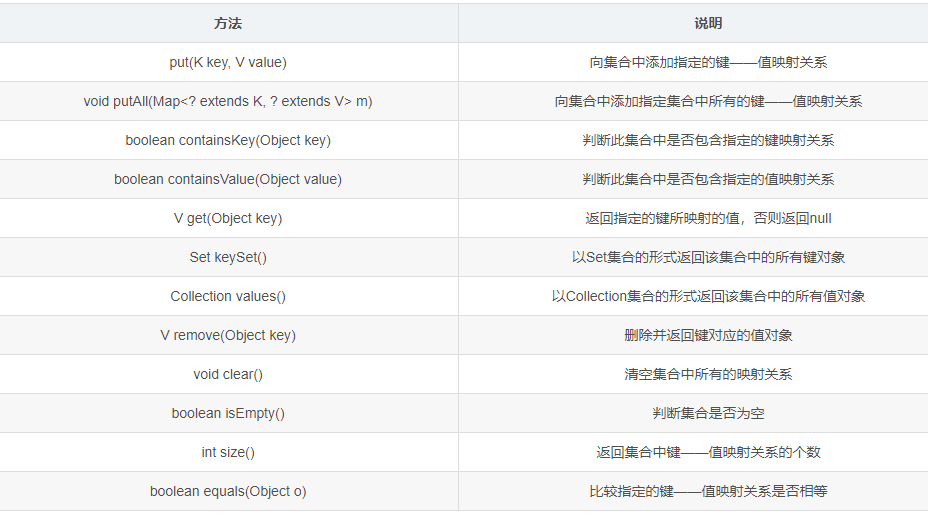
在JDK8之后,对map新增了getOrDefault()方法
Map.getOrDefault(key,默认值);
Map中会存储一一对应的key和value。
如果 在Map中存在key,则返回key所对应的的value。
如果 在Map中不存在key,则返回默认值。
Map map1 = new HashMap<>();
        Map map2 = new HashMap<>();
        Map map3 = new HashMap<>();
        map1.put(1001, "bc");
        map1.put(1002, "ab");
        map1.put(null, null);
        map2.put(1003, "B");
        map2.put(100, "C");
        map3.put(100, "C");
        map3.put(1003, "B");
        System.out.println("map1: " + map1);
        System.out.println("map2: " + map2);
        map1.putAll(map2);
        System.out.println("map1: " + map1);
        // map1: {null=null, 1001=bc, 1002=ab}
        // map2: {100=C, 1003=B}
        // map1: {null=null, 100=C, 1001=bc, 1002=ab, 1003=B}
        // 如果把map2.put(1003, "B")改为map2.put(1001, "B");
        // map1: {null=null, 1001=bc, 1002=ab}
        // map2: {100=C, 1001=B}
        // map1: {null=null, 100=C, 1001=B, 1002=ab},1001唯一,value值被覆盖
        System.out.println("map1是否包含键对象null: " + map1.containsKey(null));
        System.out.println("map1是否包含\"a\"值 :" + map1.containsValue("a"));
        System.out.println("map1的键1001的对象为 :" + map1.get(1001));
        System.out.println("map1的键对象为 :" + map1.keySet());
        System.out.println("map1的值对象为 :" + map1.values());
        System.out.println("删除1003键对象后,map1的值对象为 :" + map1.remove(1003) + "," + map1);
        // map1是否包含键对象null: true
        // map1是否包含"a"值 :false
        // map1的键1001的对象为 :bc
        // map1的键对象为 :[null, 100, 1001, 1002, 1003]
        // map1的值对象为 :[null, C, bc, ab, B]
        // 删除1003键对象后,map1的值对象为 :B,{null=null, 100=C, 1001=bc, 1002=ab}
        map1.clear();
        System.out.println("map1的值对象为 " + map1);
        System.out.println("map1是否为null" + map1.isEmpty());
        System.out.println("map2的大小" + map2.size());
        System.out.println("map2和map3是否是一个对象" + map2.equals(map3));
        // map1的值对象为 {}
        // map1是否为nulltrue
        // map2的大小2
        // map2和map3是否是一个对象true
HashMap类
HashMap实现了Map接口,因此HashMap有Map接口提供的所有常用方法。同HashSet类似,HashMap不能保证元素的顺序。
HashMap的底层实现采用了哈希表,JDK1.8之前,HashMap的底层是采用数组+链表的方法,即用链表处理哈希冲突。
HashMap map = new HashMap();
        map.put("asd", 1);
        map.put("2das", 2);
        map.put("3das", 3);
        map.put("4das", 4);
        map.put("4das", 5);// 存在相同的key时,后插入的会被覆盖
        System.out.println(map);// 不能保证有序
        System.out.println(map.containsKey(99));
        for (Object o : map.keySet()) {
            System.out.println(o + "-->" + map.get(o));
        }
{asd=1, 3das=3, 4das=5, 2das=2}
false
asd-->1
3das-->3
4das-->5
2das-->2
TreeMap类
TreeMap是Map接口的主要实现类,TreeMap存放的是有序数据,按照key进行排序。
TreeMap底层采用红黑树(红黑树的每个节点就是一个key-value对)对key-value进行排序。
import java.util.*;


        Student s1 = new Student("Allen", 20, 1);
        Student s2 = new Student("Allen", 20, 45);
        Student s3 = new Student("Catalina", 40, 2);
        Student s4 = new Student("Diana", 30, 0);
        // 无参的构造方法

        TreeMap<Student, String> map = new TreeMap<>();// 对key 排序,不然没有意义
        map.put(s2, "bb");
        map.put(s1, "aa");
        map.put(s4, "dd");
        map.put(s3, "cc");

        for (Object o : map.keySet()) {
            System.out.println(map.get(o) + "-->" + o);
        }
    }

    static class Student implements Comparable<Student> {
        // public class Student{
        private String name;
        private int age;
        private int id;

        public Student() {
        }

        public Student(String name, int age, int id) {
            this.name = name;
            this.age = age;
            this.id = id;
        }

        public String getName() {
            return name;
        }

        public void setName(String name) {
            this.name = name;
        }

        public int getAge() {
            return age;
        }

        public void setAge(int age) {
            this.age = age;
        }

        public int getId() {
            return id;
        }

        public void setId(int id) {
            this.id = id;
        }

        @Override
        public String toString() {
            return "Student{" +
                    "name='" + name + '\'' +
                    ", age=" + age +
                    ", id=" + id +
                    '}';
        }

        @Override
        public int compareTo(Student s1) {
            // int cmp = age - s1.age;//按age从小到大
            // bb-->Student{name='Allen', age=10}
            // aa-->Student{name='Allen', age=20}
            // dd-->Student{name='Diana', age=30}
            // cc-->Student{name='Catalina', age=40}

            // int cmp = name.compareTo(s1.name);
            // cmp = cmp != 0 ? cmp : age - s1.age;
            // bb-->Student{name='Allen', age=10}
            // aa-->Student{name='Allen', age=20}
            // cc-->Student{name='Catalina', age=40}
            // dd-->Student{name='Diana', age=30}

            // int cmp = s1.name.compareTo(name);
            // cmp = cmp != 0 ? cmp : s1.age - age;// 先按name大到小,然后age大到小
            // dd-->Student{name='Diana', age=30}
            // cc-->Student{name='Catalina', age=40}
            // aa-->Student{name='Allen', age=20}
            // bb-->Student{name='Allen', age=10}
            int cmp = name.compareTo(s1.name);//继续加入ID
            if (cmp != 0) {
                return cmp;
            } else {
                int cmp1 = age - s1.age;
                if (cmp1 != 0) {
                    return cmp1;
                } else {
                    return id - s1.id;
                }
            }
            // aa-->Student{name='Allen', age=20, id=1}
            // bb-->Student{name='Allen', age=20, id=45}
            // cc-->Student{name='Catalina', age=40, id=2}
            // dd-->Student{name='Diana', age=30, id=0}

        }
    }

}
常用的接口方法
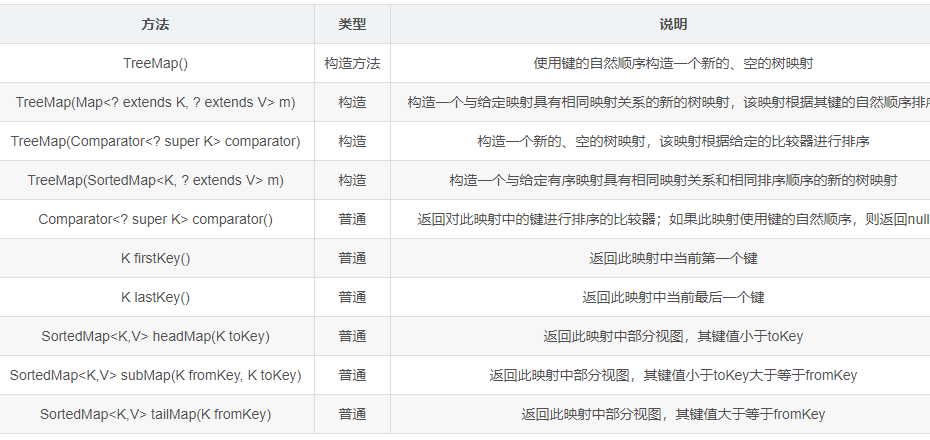
TreeMap treeMap = new TreeMap<>();//构造方法1
        treeMap.put(10, "a");
        treeMap.put(1, "a");
        treeMap.put(9, null);
        treeMap.put(5, "c");
        treeMap.put(3, null);
        System.out.println(treeMap);
        System.out.println("first key " + treeMap.firstKey());
        System.out.println("last key " + treeMap.lastKey());
        System.out.println(treeMap.headMap(3));
        System.out.println(treeMap.subMap(3, 7));
        System.out.println(treeMap.tailMap(5));
        TreeMap treeMap1 = new TreeMap(treeMap);//构造方法2
System.out.println(treeMap1);
{1=a, 3=null, 5=c, 9=null, 10=a}
first key 1
last key 10
{1=a}
{3=null, 5=c}
{5=c, 9=null, 10=a}
{1=a, 3=null, 5=c, 9=null, 10=a}
TreeMap和HashMap性能比较
HashMap没有按照键值大小输出,如果需要对key-value进行插入、删除操作,优先使用HashMap;
TreeMap按照键值大小输出,,针对需要排序的Map,优先使用TreeMap。
Stack
栈是Vector的一个子类,它实现了一个标准的后进先出的栈。
Stack stack = new Stack();
        System.out.println(stack.empty());
        stack.push(1);
        stack.push("aj");
        stack.push('A');
        System.out.println(stack.search("aj"));// 从1开始
        System.out.println(stack.peek());// 查看堆栈顶部的对象,但不从堆栈中移除它。
        while (!stack.isEmpty()) {
            Object o = stack.pop();// 移除堆栈顶部的对象,并作为此函数的值返回该对象。
            System.out.println(o);
        }
true
2
A
A
aj
1
更多文章请关注《万象专栏》
转载请注明出处:https://www.wanxiangsucai.com/read/cv125317