
- 一.简介
- 二.示例
- 讲解
- 配置文件方式存储token
- 其它返回
- 三.其它操作
一.简介
公司使用gitlab 来托管代码,日常代码merge request以及其他管理是交给测试,鉴于操作需经常打开网页,重复且繁琐,所以交给Python管理。
官方文档
安装:
pip install python-gitlab
二.示例
1.获取gitlab某个项目中,某分支的最新commit信息,提交人、提交时间、commit-id等等,主要用于搭配jenkins做这些信息的展示。当项目构建后,在钉钉显示提交人和commit的id号与jenkins的信息。
2.生成自己的token
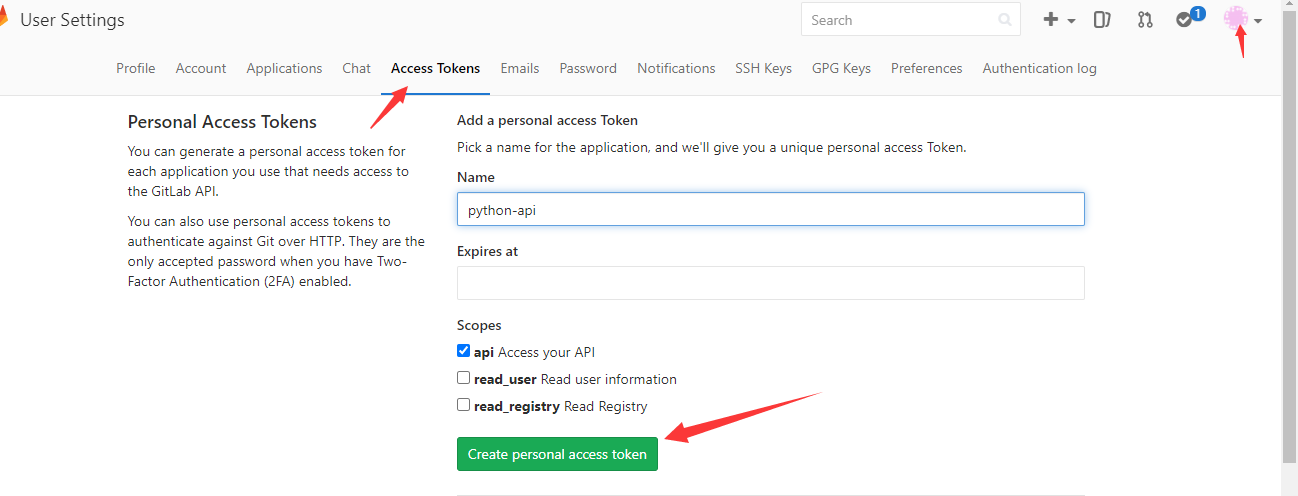
3.代码
#!/usr/bin/python3
import gitlab, json, sys

#[项目组名、项目名、分支]
group_name = sys.argv[1]
job_name = sys.argv[2]
job_branch = sys.argv[3]
job_url = group_name + '/' + job_name

gl = gitlab.Gitlab('http://10.0.23.14/', private_token='Fsdfxs7sdjssd')

projects = gl.projects.list(search=job_name)

for project in projects:
    if project.path_with_namespace == job_url:
        break

commits = project.commits.list(all=True, query_parameters={'ref_name': job_branch, 'since': '2020-11-11T00:00:00Z'})
print(commits[0].author_name)
print(commits[0].id)
讲解
projects返回一个数组,是前面search名字相似的项目,每个数组的内容都是一个对象。
每个对象返回如下:
<class 'gitlab.v4.objects.Project'> => {'id': 440, 'description': '', 'default_branch': 'master', 'tag_list': [], 'ssh_url_to_repo': 'git@47.94.250.239:jenkins/pipeline-fuction.git', 'http_url_to_repo': 'http://47.94.250.239/jenkins/pipeline-fuction.git', 'web_url': 'http://47.94.250.239/jenkins/pipeline-fuction', 'name': 'pipeline-fuction', 'name_with_namespace': 'jenkins / pipeline-fuction', 'path': 'pipeline-fuction', 'path_with_namespace': 'jenkins/pipeline-fuction', 'star_count': 0, 'forks_count': 0, 'created_at': '2020-10-15T01:24:02.322Z', 'last_activity_at': '2020-11-12T05:45:36.106Z', '_links': {'self': 'http://47.94.250.239/api/v4/projects/440', 'issues': 'http://47.94.250.239/api/v4/projects/440/issues', 'merge_requests': 'http://47.94.250.239/api/v4/projects/440/merge_requests', 'repo_branches': 'http://47.94.250.239/api/v4/projects/440/repository/branches', 'labels': 'http://47.94.250.239/api/v4/projects/440/labels', 'events': 'http://47.94.250.239/api/v4/projects/440/events', 'members': 'http://47.94.250.239/api/v4/projects/440/members'}, 'archived': False, 'visibility': 'private', 'owner': {'name': 'jenkins', 'username': 'jenkins', 'id': 5, 'state': 'active', 'avatar_url': 'http://www.gravatar.com/avatar/1656b1f22c7d92fca3ed5ab37fb442a2?s=80&d=identicon', 'web_url': 'http://47.94.250.239/jenkins'}, 'container_registry_enabled': True, 'issues_enabled': True, 'merge_requests_enabled': True, 'wiki_enabled': True, 'jobs_enabled': True, 'snippets_enabled': True, 'shared_runners_enabled': True, 'lfs_enabled': True, 'creator_id': 5, 'namespace': {'id': 8, 'name': 'jenkins', 'path': 'jenkins', 'kind': 'user', 'full_path': 'jenkins', 'parent_id': None}, 'import_status': 'none', 'import_error': None, 'avatar_url': None, 'open_issues_count': 0, 'runners_token': 'mqoNuw7tCrjaz8hP2Do7', 'public_jobs': True, 'ci_config_path': None, 'shared_with_groups': [], 'only_allow_merge_if_pipeline_succeeds': False, 'request_access_enabled': False, 'only_allow_merge_if_all_discussions_are_resolved': False, 'printing_merge_request_link_enabled': True, 'permissions': {'project_access': {'access_level': 40, 'notification_level': 3}, 'group_access': None}}
所以为了获得精确的项目,要用循环拆解开,然后project.path_with_namespace去匹配组名+项目名才行。
path_with_namespace就是这个对象的属性,找到了就break跳出即可。
commits中获取的也是一个数组,里面也是存的commit对象,每个信息如下
<class 'gitlab.v4.objects.ProjectCommit'> => {'id': '29184d28eb302c6ff82f62d943f94e6df32f21f3', 'short_id': '29184d28', 'title': 'Update CgdPortalFuction.groovy', 'created_at': '2020-11-10T16:21:43.000+08:00', 'parent_ids': ['64a9c0dbcd3b348f20c6f268672ab8aab60977cf'], 'message': 'Update CgdPortalFuction.groovy', 'author_name': '朱浩然', 'author_email': '18410168540@163.com', 'authored_date': '2020-11-10T16:21:43.000+08:00', 'committer_name': '朱浩然', 'committer_email': '18410168540@163.com', 'committed_date': '2020-11-10T16:21:43.000+08:00'}
query_parameters是过滤条件,不过只有分支起作用,since我就算写2029年也是没效果,但加上的话就会少取很多历史数据。
比如不加len(commits)是10万条,那加了since条件随意写就是最近的几百条,没仔细研究为啥,能用就行。
根据commit的返回可以输出各种属性,比如提交人、提交id等等
print(commits[0].author_name)
配置文件方式存储token
1.为了保护API 用到的 private_token,一般会将其写到系统的配置文件中去
/etc/python-gitlab.cfg 或者 ~/.python-gitlab.cfg
[global]
default = git
ssh_verify = False
timeout = 10

[git]
url = http://10.0.0.1
private_token = xxxxxxxx
api_version = 3
2.使用
## login
gl = gitlab.Gitlab.from_config('git', ['~/.python-gitlab.cfg'])

## 得到第一页project列表
projects = gl.projects.list()
## 得到所有project
projects = gl.projects.list(all=True)
projects = gl.projects.all()
其它返回
1.根据commit的id,返回详细信息
project.commits.get(commit.id)
<class 'gitlab.v4.objects.ProjectCommit'> => {'id': '293b079158c01c002afdcd84a88476e4fd8125c4', 'short_id': '293b0791', 'title': "Merge branch 'dev_new_lzj_neep5498' into business_portal_new", 'created_at': '2020-10-27T10:25:22.000+08:00', 'parent_ids': ['80f73d35650a211202940fbf9af115bd546f7c65', 'c688cda729aec3584e119ea35751930aca57a2a9'], 'message': "Merge branch 'dev_new_lzj_neep5498' into business_portal_new\n", 'author_name': 'liuzeju', 'author_email': 'liuzj@tydic.com', 'authored_date': '2020-10-27T10:25:22.000+08:00', 'committer_name': 'liuzeju', 'committer_email': 'liuzj@tydic.com', 'committed_date': '2020-10-27T10:25:22.000+08:00', 'stats': {'additions': 6, 'deletions': 4, 'total': 10}, 'status': None}
三.其它操作
"""
gitlab 经常使用到的api
DOC_URL: http://python-gitlab.readthedocs.io/en/stable/
LOCAL_PATH: C:\Python36\Lib\site-packages\gitlab
"""

import gitlab

url = 'http://xxxxxxx'
token = 'xxxxxxxxxxxxxx'

# 登录
gl = gitlab.Gitlab(url, token)

# ---------------------------------------------------------------- #
# 获取第一页project
projects = gl.projects.list()
# 获取所有的project
projects = gl.projects.list(all=True)
# ---------------------------------------------------------------- #


# ---------------------------------------------------------------- #
# 获取所有project的name,id
for p in gl.projects.list(all=True, as_list=False):
    print(p.name, p.id)
# ---------------------------------------------------------------- #


# ---------------------------------------------------------------- #
# 获取第一页project的name,id
for p in gl.projects.list(page=1):
    print(p.name, p.id)
# ---------------------------------------------------------------- #


# ---------------------------------------------------------------- #
# 通过指定id 获取 project 对象
project = gl.projects.get(501)
# ---------------------------------------------------------------- #


# ---------------------------------------------------------------- #
# 查找项目
projects = gl.projects.list(search='keyword')
# ---------------------------------------------------------------- #

# ---------------------------------------------------------------- #
# 创建一个项目
project = gl.projects.create({'name':'project1'})
# ---------------------------------------------------------------- #


# ---------------------------------------------------------------- #
# 获取公开的项目
projects = gl.projects.list(visibility='public')  # public, internal or private
# ---------------------------------------------------------------- #


#  获取 project 对象是以下操作的基础


# ---------------------------------------------------------------- #
# 通过指定project对象获取该项目的所有分支
branches = project.branches.list()
print(branches)
# ---------------------------------------------------------------- #


# ---------------------------------------------------------------- #
# 获取指定分支的属性
branch = project.branches.get('master')
print(branch)
# ---------------------------------------------------------------- #


# ---------------------------------------------------------------- #
# 创建分支
branch = project.branches.create({'branch_name': 'feature1',
                                  'ref': 'master'})
# ---------------------------------------------------------------- #


# ---------------------------------------------------------------- #
# 删除分支
project.branches.delete('feature1')
# ---------------------------------------------------------------- #


# ---------------------------------------------------------------- #
# 分支保护/取消保护
branch.protect()
branch.unprotect()
# ---------------------------------------------------------------- #


# ---------------------------------------------------------------- #
# 获取指定项目的所有tags
tags = project.tags.list()

# 获取某个指定tag 的信息
tags = project.tags.list('1.0')

# 创建一个tag
tag = project.tags.create({'tag_name':'1.0', 'ref':'master'})

# 设置tags 说明:
tag.set_release_description('awesome v1.0 release')

# 删除tags
project.tags.delete('1.0')
# or
tag.delete()

# ---------------------------------------------------------------- #
# 获取所有commit info
commits = project.commits.list()
for c in commits:
    print(c.author_name, c.message, c.title)
# ---------------------------------------------------------------- #


# ---------------------------------------------------------------- #
# 获取指定commit的info
commit = project.commits.get('e3d5a71b')
# ---------------------------------------------------------------- #


# ---------------------------------------------------------------- #
# 获取指定项目的所有merge request
mrs = project.mergerequests.list()
print(mrs)
# ---------------------------------------------------------------- #


# ---------------------------------------------------------------- #
# 获取 指定mr info
mr = project.mergerequests.get(mr_id)
# ---------------------------------------------------------------- #


# ---------------------------------------------------------------- #
#  创建一个merge request
mr = project.mergerequests.create({'source_branch':'cool_feature',
                                   'target_branch':'master',
                                   'title':'merge cool feature', })
# ---------------------------------------------------------------- #


# ---------------------------------------------------------------- #
# 更新一个merge request 的描述
mr.description = 'New description'
mr.save()
# ---------------------------------------------------------------- #


# ---------------------------------------------------------------- #
# 开关一个merge request  (close or reopen):
mr.state_event = 'close'  # or 'reopen'
mr.save()
# ---------------------------------------------------------------- #


# ---------------------------------------------------------------- #
# Delete a MR:
project.mergerequests.delete(mr_id)
# or
mr.delete()
# ---------------------------------------------------------------- #


# ---------------------------------------------------------------- #
# Accept a MR:
mr.merge()
# ---------------------------------------------------------------- #


# ---------------------------------------------------------------- #
# 指定条件过滤 所有的merge request
# state: state of the MR. It can be one of all, merged, opened or closed
# order_by: sort by created_at or updated_at
# sort: sort order (asc or desc)
mrs = project.mergerequests.list(state='merged', sort='asc')  # all, merged, opened or closed
# ---------------------------------------------------------------- #


# ---------------------------------------------------------------- #
# 创建一个commit
data = {
    'branch_name': 'master',  # v3
    'commit_message': 'blah blah blah',
    'actions': [
        {
            'action': 'create',
            'file_path': 'blah',
            'content': 'blah'
        }
    ]
}
commit = project.commits.create(data)
# ---------------------------------------------------------------- #


# ---------------------------------------------------------------- #
# Compare two branches, tags or commits:
result = project.repository_compare('develop', 'feature-20180104')
print(result)
# get the commits

for commit in result['commits']:
    print(commit)
#
# get the diffs
for file_diff in result['diffs']:
    print(file_diff)
# ---------------------------------------------------------------- #


# ---------------------------------------------------------------- #
# get the commits
for commit in result['commits']:
    print(commit)
#
# get the diffs
for file_diff in result['diffs']:
    print(file_diff)
# ---------------------------------------------------------------- #
更多文章请关注《万象专栏》
转载请注明出处:https://www.wanxiangsucai.com/read/cv101780