
导读:3 百度云API的入门 3.1 搭建环境 创建工程并导入依赖: <dependency><groupId>com.baidu.aip</groupId><artifactId>ja..
3 百度云API的入门
3.1 搭建环境
创建工程并导入依赖:
<dependency>
    <groupId>com.baidu.aip</groupId>
    <artifactId>java-sdk</artifactId>
    <version>4.8.0</version>
</dependency>
3.2 人脸注册
用于从人脸库中新增用户,可以设定多个用户所在组,及组内用户的人脸图片
典型应用场景:构建您的人脸库,如会员人脸注册,已有用户补全人脸信息等。
//人脸注册
    @Test
    public void testFaceRegister() throws Exception {
        //传入可选参数调用接口
        HashMap<String, String> options = new HashMap<String, String>();
        options.put("quality_control", "NORMAL");
        options.put("liveness_control", "LOW");
        String imageType = "BASE64";
        String groupId = "itcast";
        String userId = "1000";
        //构造base64图片字符串
        String path = "C:\\Users\\ThinkPad\\Desktop\\ihrm\\day11\\资源\\照片\\001.png";
        byte[] bytes = Files.readAllBytes(Paths.get(path));
        String image = Base64Util.encode(bytes);
        // 人脸注册
        JSONObject res = client.addUser(image, imageType, groupId, userId, options);
        System.out.println(res.toString(2));
   }
人脸注册 请求参数详情
人脸注册 返回数据参数详情
3.3 人脸更新
用于对人脸库中指定用户,更新其下的人脸图像。
   //人脸更新
    @Test
    public void testFaceUpdate() throws Exception {
        //传入可选参数调用接口
        HashMap<String, String> options = new HashMap<String, String>();
        options.put("quality_control", "NORMAL");
        options.put("liveness_control", "LOW");
        String imageType = "BASE64";
        String groupId = "itcast";
        String userId = "1000";
        //构造base64图片字符串
        String path = "C:\\Users\\ThinkPad\\Desktop\\ihrm\\day11\\资源\\照片\\001.png";
        byte[] bytes = Files.readAllBytes(Paths.get(path));
        String image = Base64Util.encode(bytes);
        //人脸注册
        JSONObject res = client.updateUser(image, imageType, groupId, userId, options);
        System.out.println(res.toString(2));
   }
人脸更新 请求参数详情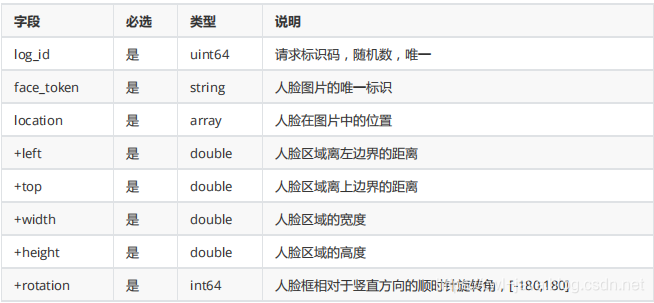
3.4 人脸检测
人脸检测:检测图片中的人脸并标记出位置信息;
	//人脸检测
    @Test
    public void testFaceDetect() throws IOException {
        String path = "C:\\Users\\ThinkPad\\Desktop\\ihrm\\day11\\资源\\照片\\002.png";
        byte[] bytes = Files.readAllBytes(Paths.get(path));
        String image = Base64Util.encode(bytes);
        String imageType = "BASE64";
        HashMap<String, String> subOptions = new HashMap<String, String>();
        subOptions.put("max_face_num", "10");
        //人脸检测
        JSONObject res = client.detect(image, imageType, subOptions);
        System.out.println(res.toString(2));
   }
人脸检测 请求参数详情
人脸检测 返回数据参数详情


3.5 人脸查找
在指定人脸集合中,找到最相似的人脸
  //人脸搜索
    @Test
    public void testFaceSearch() throws IOException {
        String path = "D:\\223.png";
        byte[] bytes = Files.readAllBytes(Paths.get(path));
        String image = Base64Util.encode(bytes);
        String imageType = "BASE64";
        HashMap<String, String> options = new HashMap<String, String>();
        options.put("user_top_num", "1");
        //人脸搜索
        JSONObject res = client.search(image, imageType, "itcast", options);
        System.out.println(res.toString(2));
   }
人脸搜索 请求参数详情
人脸搜索 返回数据参数详情
更多文章请关注《万象专栏》
转载请注明出处:https://www.wanxiangsucai.com/read/cv14799